Python Data Structures: Lists, Dictionaries, and Lists of Dictionaries
I am a dedicated and skilled Software Engineer specializing in mobile app development, backend systems, and creating secure APIs. With extensive experience in both SQL and NoSQL databases, I have a proven track record of delivering robust and scalable solutions.
Key Expertise:
Mobile App Development: I make high-quality apps for Android and iOS, ensuring they are easy to use and work well.
Backend Development: Skilled in designing and implementing backend systems using various frameworks and languages to support web and mobile applications.
Secure API Creation: Expertise in creating secure APIs, ensuring data integrity and protection across platforms.
Database Management: Experienced with SQL databases such as MySQL, and NoSQL databases like Firebase, managing data effectively and efficiently.
Technical Skills: Programming Languages: Java, Dart, Python, JavaScript, Kotlin, PHP
Frameworks: Angular, CodeIgniter, Flutter, Flask, Django
Database Systems: MySQL, Firebase
Cloud Platforms: AWS, Google Cloud Console
I love learning new things and taking on new challenges. I am always eager to work on projects that make a difference.
Python is widely used for its simplicity, especially in handling data. If you're dealing with a table like the Student Table shown in the image, you can easily model this data using lists and dictionaries (or even hashmaps in other languages). Let's break down a practical example of how we can handle student data using these data structures in Python.
Scenario: Handling Student Information
Imagine you are managing student records in a table like the one shown. The table includes details like the student's name, section, age, and email. You want to store and manipulate this data efficiently in your Python program.
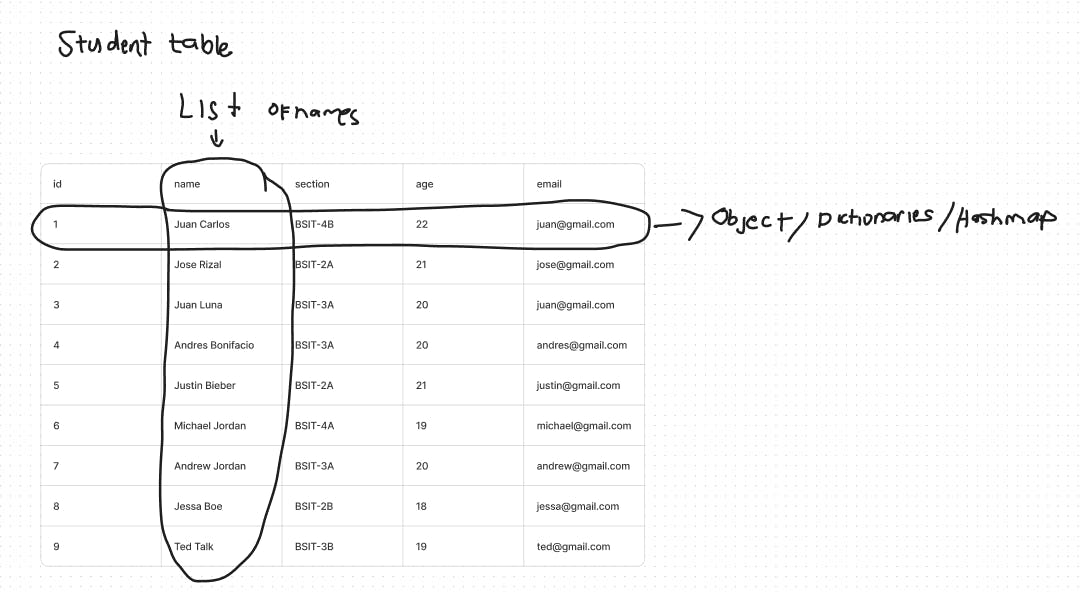
1. Using Lists to Store Data
A list in Python is an ordered collection, making it perfect for storing a list of student names or other attributes.
Example:
# List of student names
student_names = ["Juan Carlos", "Jose Rizal", "Juan Luna", "Andres Bonifacio",
                 "Justin Bieber", "Michael Jordan", "Andrew Jordan", "Jessa Boe", "Ted Talk"]

# Accessing the first student
print(student_names[0])  # Output: Juan Carlos
This list contains all the student names. You can access them by their index, modify them, or even add new students.
2. Using Dictionaries to Store Individual Student Data
In Python, a dictionary stores data in key-value pairs, which is ideal for representing the complete details of a single student (name, section, age, and email).
Example:
# Dictionary for a single student
student1 = {
    "name": "Juan Carlos",
    "section": "BSIT-4B",
    "age": 22,
    "email": "[email protected]"
}

# Accessing data
print(student1["name"])  # Output: Juan Carlos
print(student1["email"])  # Output: [email protected]
Here, the student’s data is organized by keys such as "name", "section", "age", and "email". You can retrieve or modify data by using these keys.
3. Combining Lists and Dictionaries
Often, you'll need to handle data for multiple students. You can combine lists and dictionaries by having a list of dictionaries, where each dictionary contains the details of one student. This allows you to manage a group of students efficiently.
Example:
# List of student dictionaries
students = [
    {"name": "Juan Carlos", "section": "BSIT-4B", "age": 22, "email": "[email protected]"},
    {"name": "Jose Rizal", "section": "BSIT-2A", "age": 21, "email": "[email protected]"},
    {"name": "Juan Luna", "section": "BSIT-3A", "age": 20, "email": "[email protected]"},
    {"name": "Andres Bonifacio", "section": "BSIT-3A", "age": 20, "email": "[email protected]"},
    {"name": "Justin Bieber", "section": "BSIT-2A", "age": 19, "email": "[email protected]"},
    {"name": "Michael Jordan", "section": "BSIT-4A", "age": 19, "email": "[email protected]"},
    {"name": "Andrew Jordan", "section": "BSIT-3A", "age": 18, "email": "[email protected]"},
    {"name": "Jessa Boe", "section": "BSIT-2B", "age": 18, "email": "[email protected]"},
    {"name": "Ted Talk", "section": "BSIT-3B", "age": 19, "email": "[email protected]"}
]

# Accessing the second student’s name and section
print(students[1]["name"])  # Output: Jose Rizal
print(students[1]["section"])  # Output: BSIT-2A
In this example, each student’s data is stored in a dictionary, and all student dictionaries are stored in a list. This structure makes it easy to loop through the data or find specific students by their attributes.
Use Case: Retrieving Student Emails
Suppose you want to get a list of all students' emails. You can simply loop through the list of dictionaries and extract the "email" key:
# Extracting emails of all students
emails = [student["email"] for student in students]
print(emails)
In this scenario:
Lists are used to store multiple items in an ordered way, like a list of student names.
Dictionaries store detailed information about individual students, like their name, section, age, and email.
A list of dictionaries can be used to handle multiple students' data, making it easy to store, retrieve, and manipulate student information efficiently.
This combination is highly useful in real-world applications, especially in data management tasks, making Python a powerful tool for student management systems or similar projects.