React Router
I am a dedicated and skilled Software Engineer specializing in mobile app development, backend systems, and creating secure APIs. With extensive experience in both SQL and NoSQL databases, I have a proven track record of delivering robust and scalable solutions.
Key Expertise:
Mobile App Development: I make high-quality apps for Android and iOS, ensuring they are easy to use and work well.
Backend Development: Skilled in designing and implementing backend systems using various frameworks and languages to support web and mobile applications.
Secure API Creation: Expertise in creating secure APIs, ensuring data integrity and protection across platforms.
Database Management: Experienced with SQL databases such as MySQL, and NoSQL databases like Firebase, managing data effectively and efficiently.
Technical Skills: Programming Languages: Java, Dart, Python, JavaScript, Kotlin, PHP
Frameworks: Angular, CodeIgniter, Flutter, Flask, Django
Database Systems: MySQL, Firebase
Cloud Platforms: AWS, Google Cloud Console
I love learning new things and taking on new challenges. I am always eager to work on projects that make a difference.
1. Install react-router-dom
If you haven't installed React Router yet, run this command in your project directory:
npm install react-router-dom
2. Set Up Routing in Your React App
First, make sure you have components for your pages:
LoginPage.tsxServicesPage.tsxAboutPage.tsx
Example Code:
2.1 Create Components (If you haven’t already)
LoginPage.tsx
import React from 'react';

const LoginPage: React.FC = () => {
  return <h2>This is the Login Page</h2>;
};

export default LoginPage;
ServicesPage.js
import React from 'react';

function ServicesPage() {
  return <h2>This is the Services Page</h2>;
}

export default ServicesPage;
AboutPage.js
import React from 'react';

const AboutPage: React.FC = () => {
  return <h2>This is the About Page</h2>;
};

export default AboutPage;
4 Create a Separate File for Routes
Create a new file called AppRoutes.tsxnand define all your routes there.
app.routes.tsx
import React from 'react';
import {Route, Routes} from 'react-router-dom';
import LoginPage from "./pages/LoginPage";
import ServicesPage from "./pages/ServicesPage";
import AboutPage from "./pages/AboutPage";

interface RouteProps {
    exact?: boolean;
    path: string;
    component: React.ComponentType<any>;
}


const AppRoutes: React.FC = () => {
    return (
        <Routes>
            <Route path="/login" element={<LoginPage />} />
            <Route path="/services" element={<ServicesPage />} />
            <Route path="/about" element={<AboutPage />} />
            {/* Default route */}
            <Route path="/" element={<LoginPage />} />
        </Routes>
    );
};

export default AppRoutes;
4. Use AppRoutes to App
Now you can import AppRoutes into your main App.tsx file.
App.tsx
import React from 'react';
import { BrowserRouter as Router } from 'react-router-dom';
import AppRoutes from './app.routes'; // Import your routes
import { Link } from 'react-router-dom';

const App: React.FC = () => {
  return (
      <div>
        {/* Navigation */}
        <nav>
          <ul>
            <li><Link to="/login">Login</Link></li>
            <li><Link to="/services">Services</Link></li>
            <li><Link to="/about">About</Link></li>
          </ul>
        </nav>

        {/* Render Routes */}
        <AppRoutes />
      </div>
  );
};

export default App;
3. Explanation:
app.routes.tsx: Contains all your route definitions using theSwitchandRoutecomponents.App.tsx: Now imports and uses theAppRoutescomponent to manage routing in a more organized and modular way.
5. Default Route (Optional)
You can add a default route to redirect the user to a specific page if they visit the root (/):
<Route exact path="/" component={LoginPage} />
6. Running the App
Start your development server:
npm start
Now, you can navigate to /login, /services, and /about to see each page.
This is a basic routing setup for your React app with login_page, services_page, and about_page.
OUTPUT
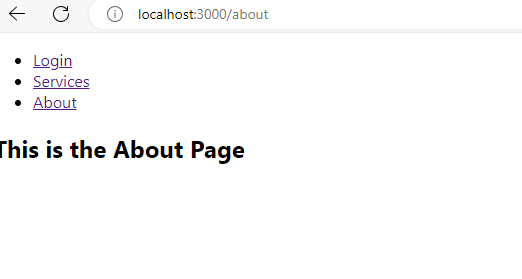


TEST:
https://react-router-thirdy.web.app/login
GITHUB: